
WeChat Official Account
Build a WeChat Official Account AI bot with LangBot. Connect LLMs to your WeChat public account.
Deploy WeChat Official Account bot to connect with LangBot.
LangBot WeChat Official Account Integration Modes
The current Official Account adapter supports three modes. Save the bot configuration after changing the mode. Existing bots keep their selected mode; the default remains drop. The legacy adapter does not offer auto.
| Mode | How replies are delivered |
|---|---|
auto | Returns a loading message, processes the request in the background, then tries the customer service API. If restricted, queues the answer for retrieval with the next message. |
passive | Returns a loading message and queues the answer. The user sends another message to retrieve it. Does not call the customer service API. |
drop (default) | Replies within the current callback. Suitable for replies completed within 5 seconds. Does not use the customer service API or fall back to retrieval. |
How auto works
auto does not query the account's verification status in advance. When the processor sends its reply, LangBot calls the customer service API and uses the actual result:
- Success: the user receives the answer without sending another message.
- Permission denied (
48001), expired reply window (45015), exhausted quota (45047), or recipient not following the account (43004): the answer is queued for retrieval with the next message. - Other failures, including credentials, IP whitelist and network errors: an error is recorded instead of treating the failure as a permission restriction.
This decision is made for each reply. An initial loading message does not mean the answer has been generated; check processor execution logs if no answer arrives.
Verification and reply windows
Callbacks require a response within 5 seconds, regardless of verification. drop uses this callback; WeChat retries do not provide a reliable 15-second generation window. See the official passive reply documentation.
Customer service messages can be sent after the callback ends. WeChat currently requires enterprise verification for Official Accounts and Service Accounts to use this API. Identity verification alone does not grant this permission; actual account permissions and API responses determine availability.
| User action | Customer service message quota | Validity |
|---|---|---|
| Sends a message | 5 messages | 48 hours |
| Clicks an eligible custom menu, follows the account, or scans a QR code | 3 messages | 1 minute |
These are platform limits, not AI generation timeouts. Consult the official customer service API documentation for current rules.
Retrieving replies
In passive, or after auto falls back, the next message retrieves the previous answer and is not also processed as a new question. If the answer is still being generated, the loading message is returned again. Retrieve the answer before sending a new question.
LoadingMessage applies to both auto and passive, not drop. For auto, use wording such as “Processing your request. If no answer arrives, send any message later to retrieve it.” If empty, LangBot acknowledges the callback without a visible loading message.
Queued replies are stored in memory and cleared when LangBot restarts or the bot configuration is reloaded. All modes remain subject to WeChat content and message-length limits.
Route incoming messages to a processor. Reply modes do not automatically send every Agent text output: approve the reply-to-current-conversation tool and instruct the Agent to use it. Plugin processors must call the reply API.
Create Bot
Enter the WeChat Official Account Platform, if you already have an official account, scan the QR code to log in and enter the console.
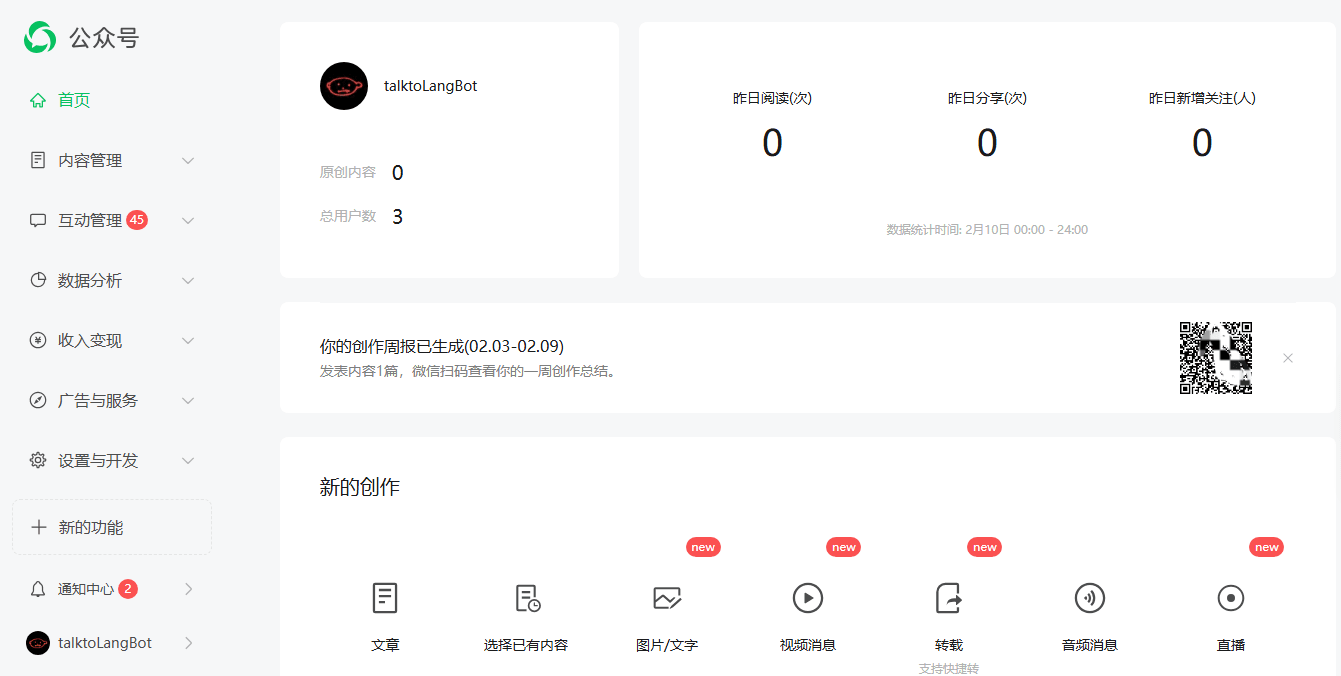
If you haven't registered an official account before, click Register Now, select Official Account, fill in the information in sequence, and enter the console. The console looks like this:
Set Callback Address
WeChat Official Account requires a public domain and HTTPS. If you don't have a server, LangBot Cloud includes built-in domain resolution — sign up and get started immediately.
Get Configuration Items
Click Settings and Development, Development Interface Management, and you'll see a page like this:
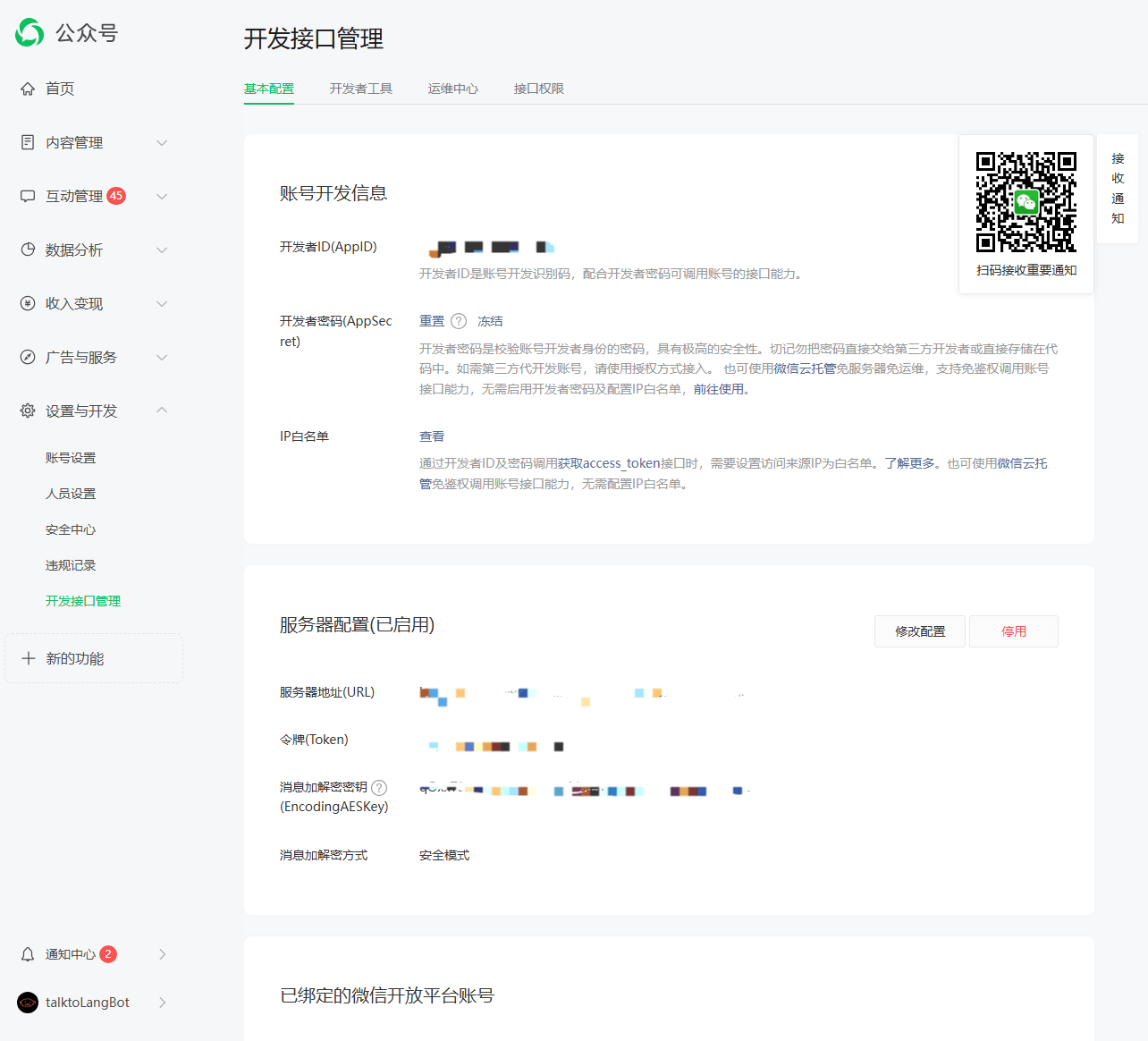
Record the Developer ID (AppID), Developer Password (AppSecret), and add the server where LangBot is deployed to the IP Whitelist.
Set Up Reverse Proxy for LangBot
Since WeChat Official Accounts only support http (port 80) and https (port 443), please follow the documentation Configure HTTP Reverse Proxy and SSL for configuration.
Save Callback Address
Click Set Server Configuration, enter Token, EncodingAESKey, and change the message encryption/decryption method to Safe Mode.
At this point, open the LangBot Webui page, create a new bot, and fill in the four configuration items obtained (AppID, AppSecret, token, EncodingAESKey)
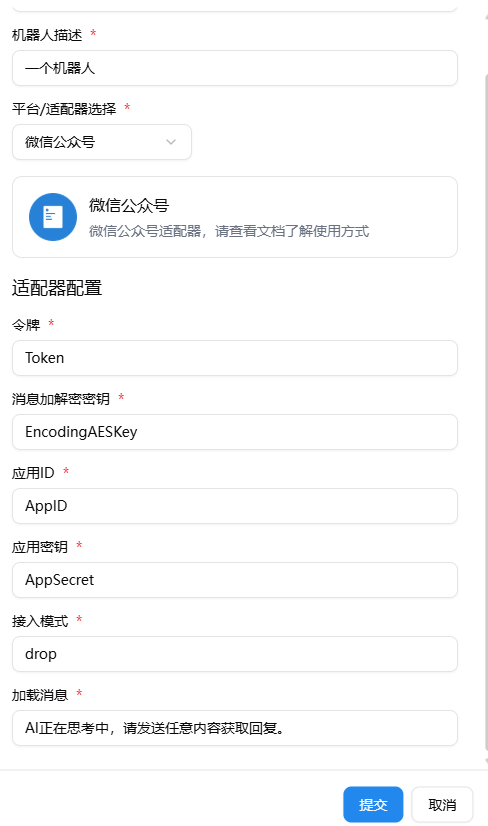
Select auto, passive, or drop in Mode using the comparison above. The default is drop.
The LoadingMessage option controls the loading message for auto and passive. Set enable to true.
After filling in successfully, on the LangBot homepage, enable and select the corresponding bot, click to enter the configuration page, copy the Webhook callback address, return to the WeChat Official Account bot configuration page, and fill it into URL. For example, if the URL is filled as https://your_domain_name/bots/xxxxx, where your_domain_name is the domain name filled in Caddy. Click Save. If it can be saved successfully, it means the deployment is successful. If you see System error, please try again later, please recheck whether the above configuration content is filled in correctly.