
Telegram
Build a Telegram AI bot with LangBot. Connect GPT, Claude, Gemini, DeepSeek and Dify to Telegram chats and groups.
Create a bot
Open the official BotFather in Telegram, send /newbot, and choose a name and a username ending in bot. Keep the returned Token private; do not include it in group messages or screenshots.
This guide covers the new Telegram adapter in LangBot 4.11 (internal name telegram-omni). Do not select the deprecated legacy adapter.
Configure and enable
- Configure a working model provider and model in LangBot, then create a Pipeline, Agent, or plugin processor.
- Create a bot under Bots, select Telegram, and enter the Token.
- Bind a message processor to
message.received. A Pipeline runs a conversation flow; an Agent handles events with tools. Plugin processors can also subscribe independently. - Enable Markdown and streaming as needed, enable the bot, and save. Save again after changing processor bindings.
- Open the bot's private chat in Telegram, click Start, and send a test message. Check the processor's run status and reply tool result in LangBot as well.
The adapter uses long polling and requires outbound access to api.telegram.org. An inbound Webhook is not required to receive messages. Only one polling instance should use a Token; do not enable the same bot in another LangBot instance simultaneously.
Choose a processor
| Type | Configuration and checks |
|---|---|
| Pipeline | Set the model and trigger rules. Group mentions or prefixes must still match the rules. With streaming enabled, a streaming-capable processor can progressively update the Telegram message. |
| Agent | Configure the model, instructions, and event tools. Instruct it to use event_reply or another sending tool; model text alone does not prove delivery to Telegram. |
| Plugin processor | Install and configure the plugin processor, bind it to the bot, and save. Independent subscriptions can run alongside the main processor, so one message can produce two replies. |
For attachment tasks, enable Box for the processor and use its sandbox tools and attachment delivery capabilities. Box must be ready. An external filesystem MCP server does not share Box's filesystem. Image understanding also requires a vision-capable model.
The bot's streaming toggle does not make every tool call stream tokens. An Agent's event_reply sends a complete message; plugin streaming depends on its implementation. Verify actual Telegram updates and processor logs separately.
Private chats and groups
Click Start in a private chat first. For groups, add the bot to a test group and follow the processor's trigger rules, for example with a command addressed to the bot or a reply to its message.
Disabling Privacy Mode is not mandatory for every group scenario. Telegram delivers different messages for directed commands, replies, administrator bots, and ordinary group traffic. To receive ordinary group messages, adjust privacy mode in BotFather and re-add the bot when Telegram requires it, or grant administrator status where appropriate. See Telegram's privacy mode documentation.
Member-status and reaction updates must satisfy Telegram's administrator requirements for those update types. Grant only the permissions the feature needs; do not enable deletion, bans, or adding administrators merely to receive events. Telegram delivery rules and LangBot trigger rules both apply.
Upgrading a basic group to a supergroup changes its ID. The Bot API group ID in event logs can also differ from the Telegram Web URL; do not construct a group ID from that URL.
Images, files, and streaming
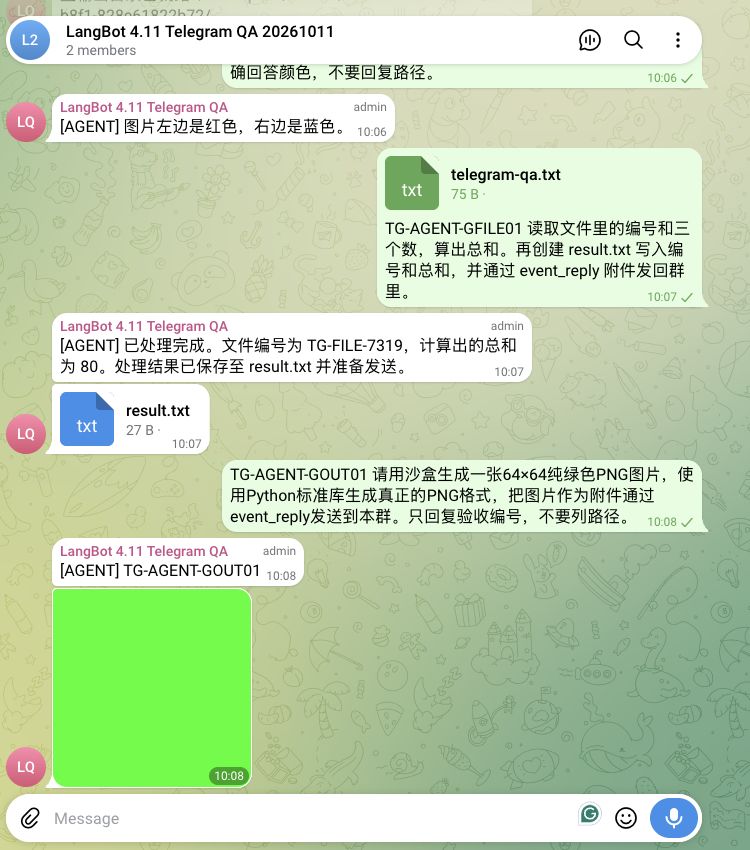
Images and files arrive as message attachments. Test with a clearly captioned image and a text file whose content can be checked. Verify the actual returned image or file rather than a textual claim that it was sent.
Streaming text progressively updates a Telegram message; attachments are sent separately at completion. Generated files must use the processor's attachment output mechanism, not just return a sandbox path. Images Telegram cannot process as photos are retried as documents to preserve their original bytes.
Other events
Bind an Agent or plugin processor to the required events. Pipelines primarily handle message flows; do not treat every non-message event as ordinary chat.
| Event | Trigger and meaning |
|---|---|
message.received | A private or group message, including supported attachments. |
message.edited | An existing message is edited. |
message.reaction | A user adds or removes a reaction. is_add identifies the direction; reaction retains the removed emoji. |
group.member_joined | A member joins. |
group.member_left | A member leaves or is removed; inspect is_kicked. |
group.member_banned | A member is restricted, such as being muted; this does not mean they were removed. |
bot.invited_to_group | The bot is added to a group. |
bot.removed_from_group | The bot is removed, including when previously restricted. |
bot.muted | The bot loses permission to send messages. An indefinite restriction has duration: null. |
bot.unmuted | Sending permission is restored, even if other restrictions remain. |
platform.specific | Other platform events, such as permission changes or callbacks. Inspect action and data. |
Start with a logging-only plugin processor to confirm delivery before adding replies or moderation actions. A muted or removed bot may receive the event while no longer being able to reply in that group. Evaluate reception and sending permission separately.
Troubleshooting
- No reply: check enabled state, saved bindings, private-chat Start, group privacy mode, and trigger rules, then inspect the processor run.
- Delivered message but failed run: expand the run and inspect tool results. A visible Telegram message alone does not prove the entire task succeeded.
- Model errors or timeouts: check the provider and model separately from Telegram delivery.
- Only a file path is returned: check Box, tool permissions, and whether the attachment sending tool actually ran.
- Duplicate replies: check overlapping main/independent subscriptions and multiple polling instances.
- Missing reactions or member events: check administrator status and event bindings. Test in a dedicated group without affecting real members.