
组件开发
组件:页面
Page 组件允许插件在 LangBot 的 WebUI 侧边栏中注册自定义的可视化页面。页面运行在 iframe 沙箱中,通过 Page SDK 与宿主通信,并可调用插件后端 API。
适用场景
- 管理面板:为插件提供可视化的配置和数据管理界面(如 FAQ 管理、数据统计仪表盘)
- 数据展示:展示插件运行时的统计数据、日志、图表等
- 交互式工具:提供表单、编辑器等交互式界面
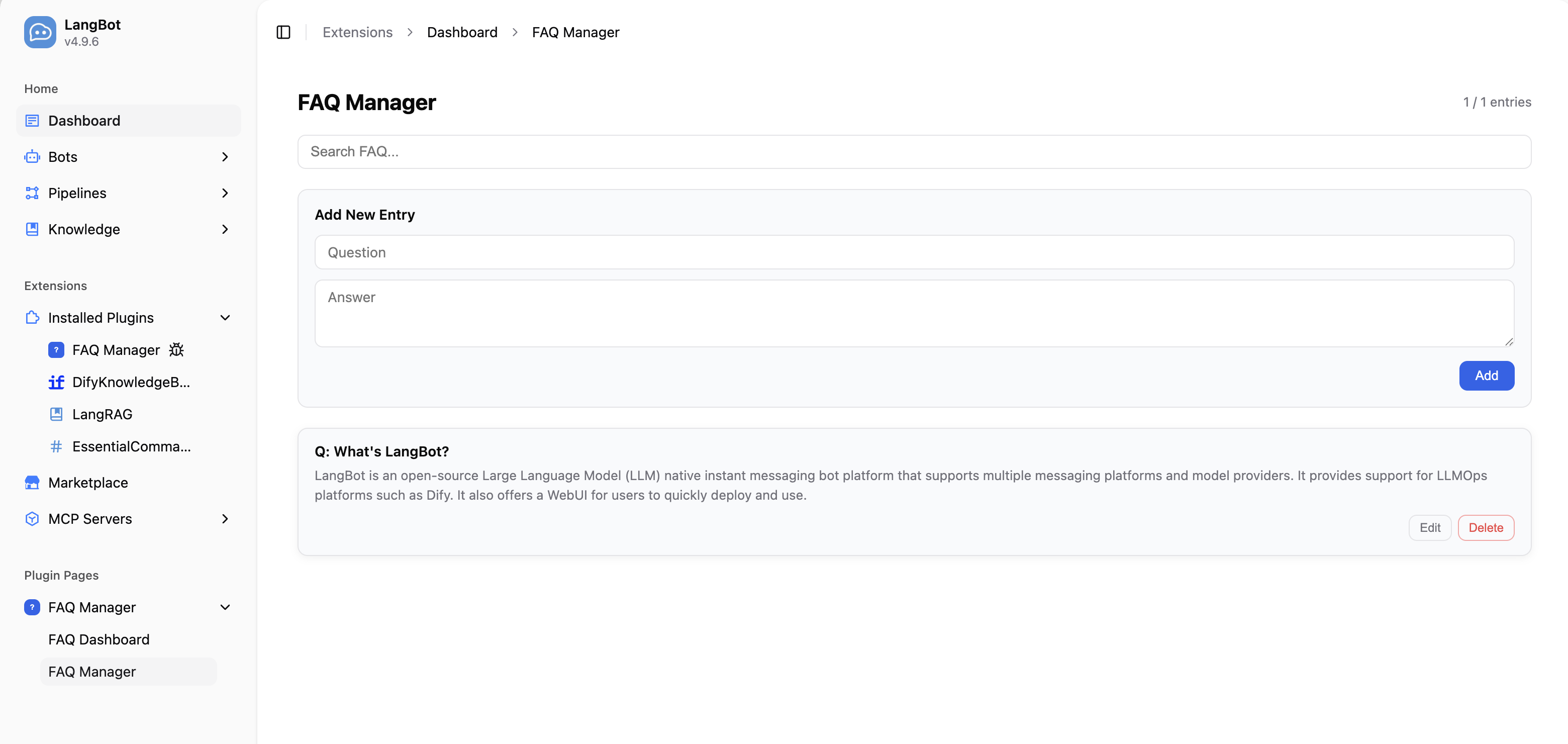
添加页面组件
在插件目录执行命令:
lbp comp Page根据提示输入页面名称后,会在 components/pages/ 目录下生成页面文件:
├── components
│   └── pages
│       └── dashboard
│           ├── dashboard.yaml   # 页面清单
│           ├── dashboard.py     # 页面后端处理程序
│           ├── index.html       # 页面入口
│           └── i18n             # 翻译文件(可选)
│               ├── en_US.json
│ └── zh_Hans.json同时,manifest.yaml 中会添加组件发现配置:
spec:
  components:
    Page:
      fromDirs:
      - path: components/pages/
        maxDepth: 2
清单文件:页面
apiVersion: v1  # 请勿修改
kind: Page  # 请勿修改
metadata:
  name: dashboard  # 页面唯一 ID,同一插件内不可重复
  label:
    en_US: Dashboard  # 页面显示名称,显示在 WebUI 侧边栏,支持多语言
    zh_Hans: 仪表盘
spec:
  path: index.html  # HTML 入口文件,相对于该 YAML 所在目录的路径
execution:
  python:
    path: dashboard.py  # 页面后端处理程序
    attr: DashboardPage  # 处理程序类名
后端处理
Page 组件的后端处理程序继承 Page 基类,实现 handle_api 方法来处理来自前端页面的 API 请求。
from langbot_plugin.api.definition.components.page import Page, PageRequest, PageResponse


class DashboardPage(Page):

    async def handle_api(self, request: PageRequest) -> PageResponse:
        # request.endpoint: API 端点路径,如 '/stats'
        # request.method:   HTTP 方法(GET、POST、PUT、DELETE)
        # request.body:     请求体(已解析的 JSON,或 None)

        if request.endpoint == '/stats' and request.method == 'GET':
            # 从 Host 存储读取当前 installation 的数据
            entries = await self.load_entries_for_current_installation()
            return PageResponse.ok({'total': len(entries)})

        return PageResponse.fail(f'Unknown endpoint: {request.endpoint}')
PageRequest 字段
| 字段 | 类型 | 说明 |
|---|---|---|
endpoint | str | API 端点路径(如 '/entries') |
method | str | HTTP 方法(GET、POST、PUT、DELETE) |
body | Any | 请求体(已解析的 JSON,或 None) |
PageResponse 构造
| 方法 | 说明 |
|---|---|
PageResponse.ok(data) | 成功响应,data 为任意可 JSON 序列化的数据 |
PageResponse.fail(error) | 失败响应,error 为错误信息字符串 |
前端页面开发
在 HTML 文件中引入 Page SDK,即可与插件后端通信:
<!DOCTYPE html>
<html>
<head>
  <meta charset="UTF-8">
  <style>
    body {
      background: var(--langbot-bg, #ffffff);
      color: var(--langbot-text, #0a0a0a);
      font-family: -apple-system, BlinkMacSystemFont, 'Segoe UI', Roboto, sans-serif;
      padding: 24px;
    }
  </style>
</head>
<body>
  <h1 data-i18n="title">Dashboard</h1>
  <p id="stats"></p>

  <script src="/api/v1/plugins/_sdk/page-sdk.js"></script>
  <script>
    langbot.onReady(async function(ctx) {
      // 调用后端 API
      var data = await langbot.api('/stats', null, 'GET');
      document.getElementById('stats').textContent = 'Total: ' + data.total;
    });
  </script>
</body>
</html>
Page SDK API
| 方法 | 说明 |
|---|---|
langbot.onReady(callback) | SDK 就绪后触发回调,callback 接收 ctx 参数(包含 theme 和 language) |
langbot.api(endpoint, body?, method?) | 调用插件后端 handle_api,返回 Promise |
langbot.t(key, fallback?) | 获取翻译字符串 |
langbot.onThemeChange(callback) | 主题变更回调 |
langbot.onLanguageChange(callback) | 语言变更回调 |
langbot.applyI18n() | 手动重新应用 data-i18n 翻译 |
暗色模式
SDK 会自动在页面上设置 CSS 自定义属性,直接使用即可:
| CSS 变量 | 用途 |
|---|---|
--langbot-bg | 页面背景色 |
--langbot-bg-card | 卡片背景色 |
--langbot-text | 主文字色 |
--langbot-text-muted | 次要文字色 |
--langbot-border | 边框色 |
--langbot-accent | 强调色 |
页面 i18n
在页面目录下创建 i18n/ 目录,放入 JSON 翻译文件:
pages/dashboard/
├── index.html
└── i18n/
    ├── en_US.json
    └── zh_Hans.json
翻译文件格式为扁平 JSON 键值对:
{
  "title": "仪表盘",
  "totalEntries": "条目总数"
}
在 HTML 元素上添加 data-i18n 属性,SDK 会自动替换文本:
<h1 data-i18n="title">Dashboard</h1>完整示例:FAQ 管理器
以下是一个完整的 Page 组件示例,实现了 FAQ 条目的增删改查。
后端处理程序(components/pages/manager/manager.py):
from langbot_plugin.api.definition.components.page import Page, PageRequest, PageResponse


class ManagerPage(Page):

    async def handle_api(self, request: PageRequest) -> PageResponse:
        if request.endpoint == '/entries' and request.method == 'GET':
            entries = await self.load_entries_for_current_installation()
            return PageResponse.ok({'entries': entries})

        if request.endpoint == '/entries' and request.method == 'POST':
            question = (request.body or {}).get('question', '').strip()
            answer = (request.body or {}).get('answer', '').strip()
            if not question or not answer:
                return PageResponse.fail('question and answer are required')
            entry = {'question': question, 'answer': answer}
            await self.save_entry_for_current_installation(entry)
            return PageResponse.ok({'entry': entry})

        if request.endpoint == '/entries' and request.method == 'DELETE':
            entry_id = (request.body or {}).get('id', '')
            if await self.delete_entry_for_current_installation(entry_id):
                return PageResponse.ok({'deleted': entry_id})
            return PageResponse.fail('entry not found')

return PageResponse.fail(f'Unknown: {request.method} {request.endpoint}')前端页面(components/pages/manager/index.html)中通过 langbot.api() 调用后端:
// 加载条目
var data = await langbot.api('/entries', null, 'GET');

// 添加条目
await langbot.api('/entries', { question: '...', answer: '...' }, 'POST');

// 删除条目
await langbot.api('/entries', { id: '...' }, 'DELETE');
完整示例代码请参考 FAQManager 插件。
一个安装,多份用法
同一个 Page 会被多次页面请求调用(同一安装下的不同请求、不同工作区):
- 不要把上一次请求的数据留在实例上;端点、方法、body 与当前安装信息一律从当前
PageRequest/ 绑定取。 - 页面数据一律按安装作用域存放(installation-scoped Host 存储);
self.plugin是进程级共享对象,不能保存租户数据。 - 不同工作区的请求会共享同一个 Page 实例,实例字段会被交织使用;需要跨请求保留的数据放 Host 存储。
- 如果按安装维护了进程内缓存,请在
on_installation_revoked(binding)中释放。
以上约束的完整说明见认证插件与共享运行。
注意事项
- 页面运行在
sandbox="allow-scripts allow-forms"的 iframe 中,不能弹窗或导航父页面 - 认证 Page 必须把租户数据放在 installation-scoped Host 存储中;
self.plugin是进程级共享对象,不能保存租户条目。上面的存储 helper 名仅为示意,请使用当前组件可用的 SDK Host 存储 API。 - 使用
PageResponse.ok()和PageResponse.fail()构造响应,确保格式一致 - Page SDK 的
<script>标签必须放在使用langbot对象的代码之前