# Component: Page
Source: https://langbot.app/docs/en/plugin/dev/components/page
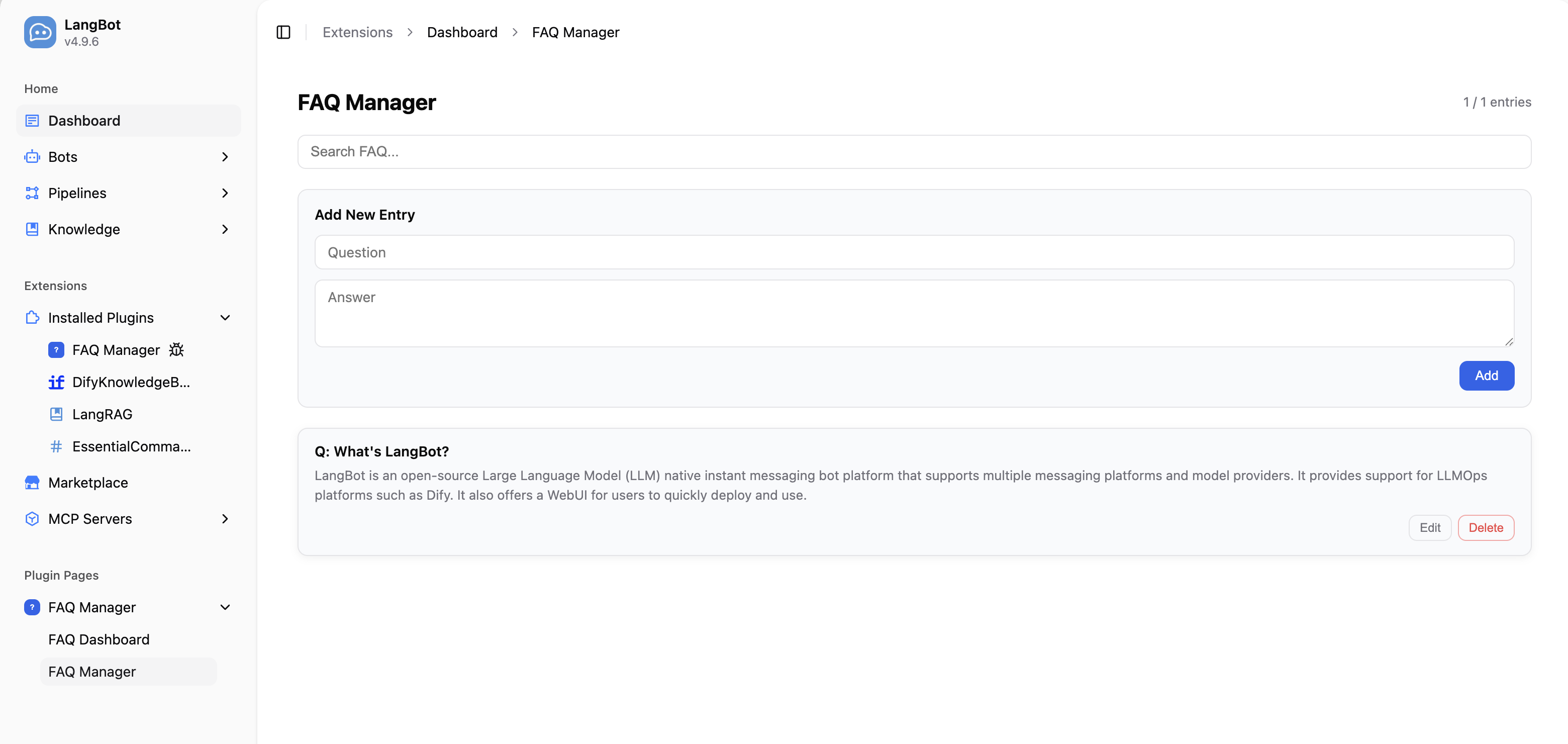
The Page component allows plugins to register custom visual pages in the LangBot WebUI sidebar. Pages run inside an iframe sandbox, communicate with the host via the Page SDK, and can call the plugin's backend API.
## Use Cases
- **Admin panels**: Provide visual configuration and data management interfaces (e.g., FAQ management, analytics dashboards)
- **Data displays**: Show runtime statistics, logs, charts, etc.
- **Interactive tools**: Provide forms, editors, and other interactive interfaces
## Adding a Page Component
Run the following command in the plugin directory:
```bash
lbp comp Page
```
After entering the page name, the CLI will generate page files under `components/pages/`:
```bash
├── components
│ └── pages
│ └── dashboard
│ ├── dashboard.yaml # Page manifest
│ ├── dashboard.py # Backend handler
│ ├── index.html # Page entry point
│ └── i18n # Translation files (optional)
│ ├── en_US.json
│ └── zh_Hans.json
```
The plugin's `manifest.yaml` will also be updated with the component discovery config:
```yaml
spec:
components:
Page:
fromDirs:
- path: components/pages/
maxDepth: 2
```
## Manifest File: Page
```yaml
apiVersion: v1 # Do not modify
kind: Page # Do not modify
metadata:
name: dashboard # Unique page ID within the plugin
label:
en_US: Dashboard # Display name shown in the WebUI sidebar, supports i18n
zh_Hans: 仪表盘
spec:
path: index.html # HTML entry file, relative to this YAML file's directory
execution:
python:
path: dashboard.py # Backend handler file
attr: DashboardPage # Handler class name
```
## Backend Handler
The Page component's backend handler extends the `Page` base class and implements `handle_api` to process API requests from the frontend page.
```python
from langbot_plugin.api.definition.components.page import Page, PageRequest, PageResponse
class DashboardPage(Page):
async def handle_api(self, request: PageRequest) -> PageResponse:
# request.endpoint: API endpoint path, e.g. '/stats'
# request.method: HTTP method (GET, POST, PUT, DELETE)
# request.body: Request body (parsed JSON, or None)
if request.endpoint == '/stats' and request.method == 'GET':
# Read installation-scoped data from a Host storage API.
entries = await self.load_entries_for_current_installation()
return PageResponse.ok({'total': len(entries)})
return PageResponse.fail(f'Unknown endpoint: {request.endpoint}')
```
### PageRequest Fields
| Field | Type | Description |
| ---------- | ----- | -------------------------------------------- |
| `endpoint` | `str` | API endpoint path (e.g. `'/entries'`) |
| `method` | `str` | HTTP method (`GET`, `POST`, `PUT`, `DELETE`) |
| `body` | `Any` | Request body (parsed JSON, or `None`) |
### PageResponse Construction
| Method | Description |
| -------------------------- | ----------------------------------------------------------- |
| `PageResponse.ok(data)` | Success response. `data` can be any JSON-serializable value |
| `PageResponse.fail(error)` | Error response. `error` is a human-readable error string |
## Frontend Page Development
Include the Page SDK in your HTML file to communicate with the plugin backend:
```html
Dashboard
```
### Page SDK API
| Method | Description |
| --------------------------------------- | ------------------------------------------------------------------------------ |
| `langbot.onReady(callback)` | Fires when SDK is ready. `callback` receives `ctx` with `theme` and `language` |
| `langbot.api(endpoint, body?, method?)` | Calls the plugin's `handle_api`. Returns a Promise |
| `langbot.t(key, fallback?)` | Gets a translated string |
| `langbot.onThemeChange(callback)` | Fires when the theme changes |
| `langbot.onLanguageChange(callback)` | Fires when the language changes |
| `langbot.applyI18n()` | Manually re-apply `data-i18n` translations |
### Dark Mode
The SDK automatically sets CSS custom properties on the page. Use them directly:
| CSS Variable | Purpose |
| ---------------------- | -------------------- |
| `--langbot-bg` | Page background |
| `--langbot-bg-card` | Card background |
| `--langbot-text` | Primary text color |
| `--langbot-text-muted` | Secondary text color |
| `--langbot-border` | Border color |
| `--langbot-accent` | Accent color |
### Page i18n
Create an `i18n/` directory inside your page directory with JSON translation files:
```
pages/dashboard/
├── index.html
└── i18n/
├── en_US.json
└── zh_Hans.json
```
Translation files are flat JSON key-value pairs:
```json
{
"title": "Dashboard",
"totalEntries": "Total Entries"
}
```
Add the `data-i18n` attribute to HTML elements for automatic translation:
```html
Dashboard
```
## Full Example: FAQ Manager
Here is a complete Page component example that implements CRUD operations for FAQ entries.
**Backend handler** (`components/pages/manager/manager.py`):
```python
from langbot_plugin.api.definition.components.page import Page, PageRequest, PageResponse
class ManagerPage(Page):
async def handle_api(self, request: PageRequest) -> PageResponse:
if request.endpoint == '/entries' and request.method == 'GET':
entries = await self.load_entries_for_current_installation()
return PageResponse.ok({'entries': entries})
if request.endpoint == '/entries' and request.method == 'POST':
question = (request.body or {}).get('question', '').strip()
answer = (request.body or {}).get('answer', '').strip()
if not question or not answer:
return PageResponse.fail('question and answer are required')
entry = {'question': question, 'answer': answer}
await self.save_entry_for_current_installation(entry)
return PageResponse.ok({'entry': entry})
if request.endpoint == '/entries' and request.method == 'DELETE':
entry_id = (request.body or {}).get('id', '')
if await self.delete_entry_for_current_installation(entry_id):
return PageResponse.ok({'deleted': entry_id})
return PageResponse.fail('entry not found')
return PageResponse.fail(f'Unknown: {request.method} {request.endpoint}')
```
**Frontend page** (`components/pages/manager/index.html`) calls the backend via `langbot.api()`:
```javascript
// Load entries
var data = await langbot.api('/entries', null, 'GET');
// Add entry
await langbot.api('/entries', { question: '...', answer: '...' }, 'POST');
// Delete entry
await langbot.api('/entries', { id: '...' }, 'DELETE');
```
Full example code is available at [FAQManager plugin](https://github.com/langbot-app/langbot-plugin-demo/tree/main/FAQManager).
## One installation, many usages
The same Page is called by **many page requests** (different requests and different Workspaces under one installation):
- Never leave the previous request's data on the instance; take the endpoint, method, body and current installation information from the current `PageRequest` / binding every time.
- Page data always lives in installation-scoped Host storage; `self.plugin` is a process-level shared object and must not hold tenant data.
- Requests from different Workspaces share the same Page instance, so instance fields get interleaved; data that must survive requests belongs in Host storage.
- If you keep per-installation process-local caches, release them in `on_installation_revoked(binding)`.
See [Certified plugins and shared runtime](https://langbot.app/docs/en/plugin/certified-plugins.md) for the full specification.
## Notes
- Pages run inside a `sandbox="allow-scripts allow-forms"` iframe and cannot open popups or navigate the parent page
- Certified Pages must keep tenant data in installation-scoped Host storage. `self.plugin` is process-wide and must not hold tenant entries. The storage helper names above are illustrative; use the current SDK Host storage APIs available to your component.
- Use `PageResponse.ok()` and `PageResponse.fail()` to construct responses for consistent formatting
- The Page SDK `